HOS planning for people
who'd rather not read CFR 395.
A visual Hours of Service planner that shows your drive time, rest windows, and resets before you find out the hard way. And when your ELD dies, it walks you through the federal paperwork until it's fixed.
(Built by someone who has written this rules engine twice professionally and apparently couldn't leave it alone.)
Why does this exist?
In the 1990s I built the HOS rules engine for RapidLog — one of the first electronic logbook products for commercial drivers. Then I built it again in the early 2000s for Logbook.com. Two full professional implementations, from scratch, against the actual regulation.
Then the industry moved to ELDs, the products moved on, and I moved on with them. But the problem never quite left me. The regulations kept changing — the sleeper berth split rules alone have been revised more times than I care to count — and I kept finding myself reading the updated CFR sections out of what I can only describe as habit at this point.
So I built it a third time. Not for a product. Not for a company. Just because I enjoy it, the developer tools are better than they were in 2002, and there was a gap in the market for a planner that actually gets the edge cases right. This one runs on Windows and in a browser, with iOS and Android on the way — which is something neither of the previous two managed.
It won't file your logs. It won't talk to your ELD. It's a planning tool — a way to think through your day before you start the engine. Third time building the engine. First time doing it purely for the love of the problem.
What the obsession built
Every feature exists because the regulation said it had to, or because someone on the road actually needed it. Usually both.
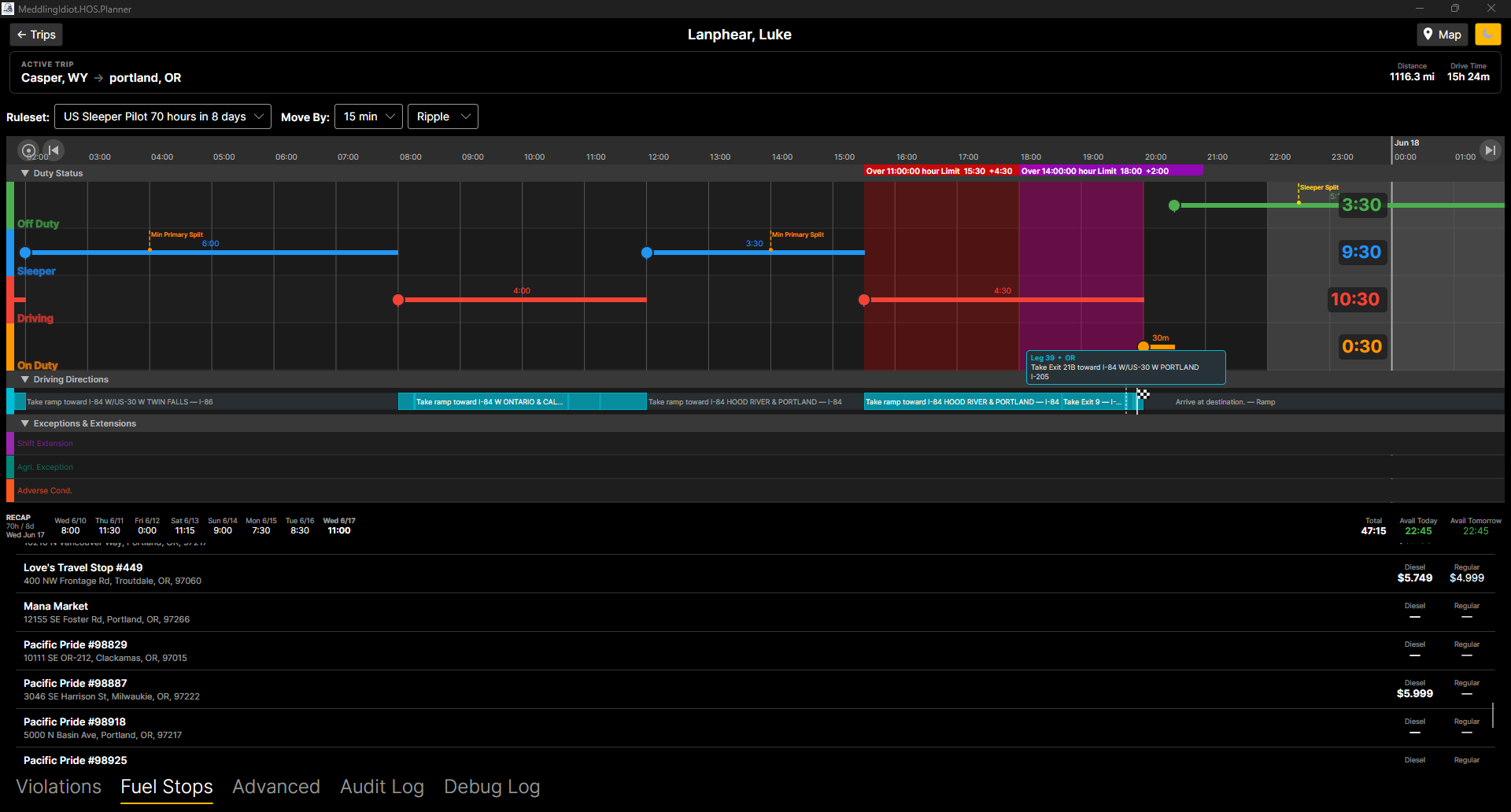
Visual HOS Timeline
Drag-and-drop duty status markers on a scrollable timeline. Segment durations update live. See your whole day at a glance without doing the math in your head.
The math is done for you. All of it.
Live Violation Detection
Colored violation bands appear instantly as you plan — 11-hour driving limit, 14-hour shift window, 8-hour unbroken driving, and 60/70-hour cycle all checked in real time.
Because finding out at the weigh station is not ideal.
Rest Target Indicators
Markers show exactly when you hit a Global Reset, a Minimum Full Rest, or a valid Sleeper Berth Split — including paired split detection for team drivers.
Yes, the paired split logic is correctly implemented. It took a while.
Route on the Timeline
Imported directions are overlaid directly on the timeline so you can see your position, your remaining hours, and your next rest window all at once.
Turns out knowing where you'll be is more useful than knowing where you were.
Fuel & Parking Search
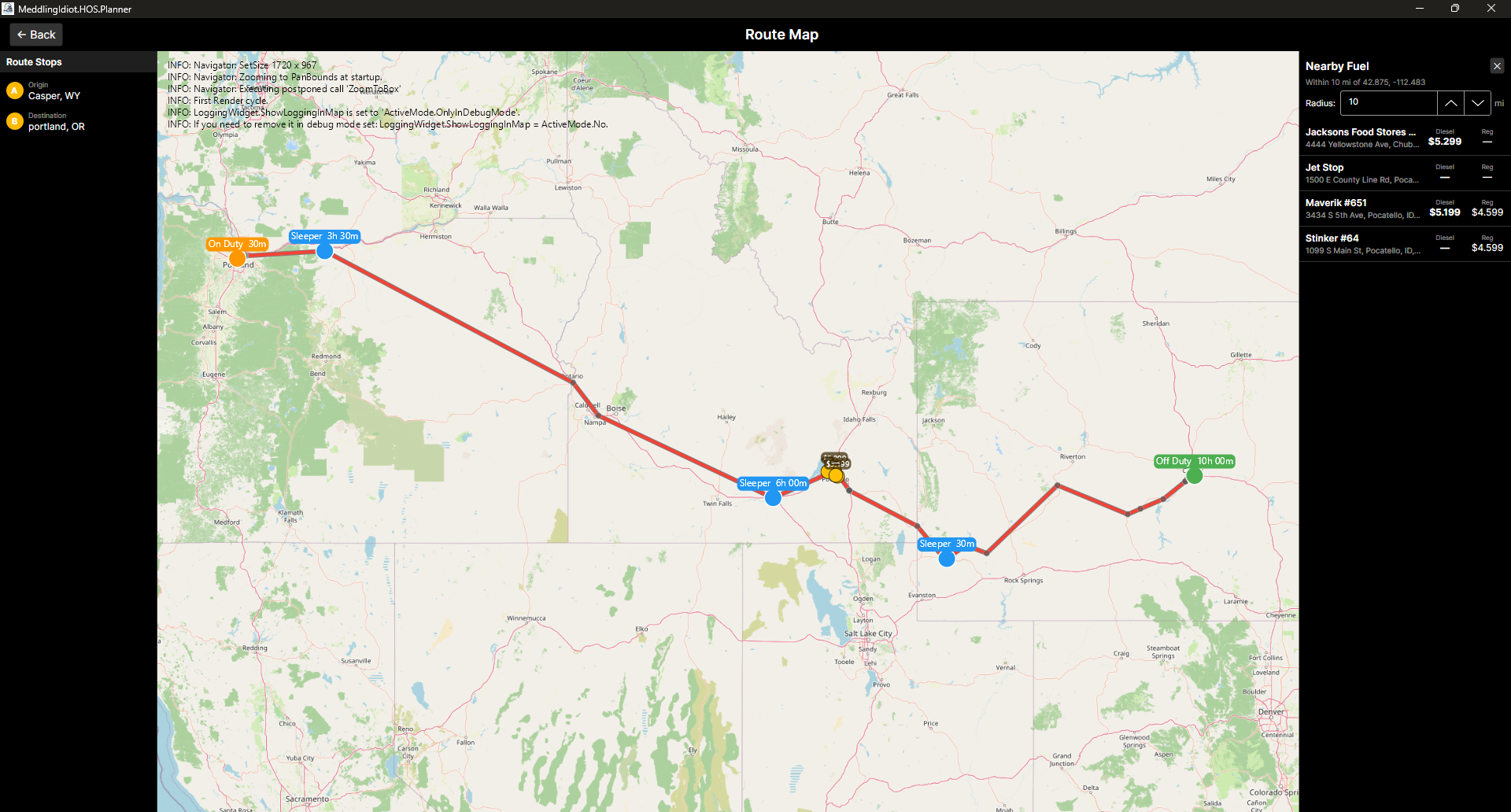
Tap your route at any point to search the Axis network for truck stops — diesel prices, amenities, and truck parking space counts, sortable by Best Parking, Cheapest Diesel, or Nearest.
Added because having to open a second app felt wrong.
"Where Should I Stop Tonight?"
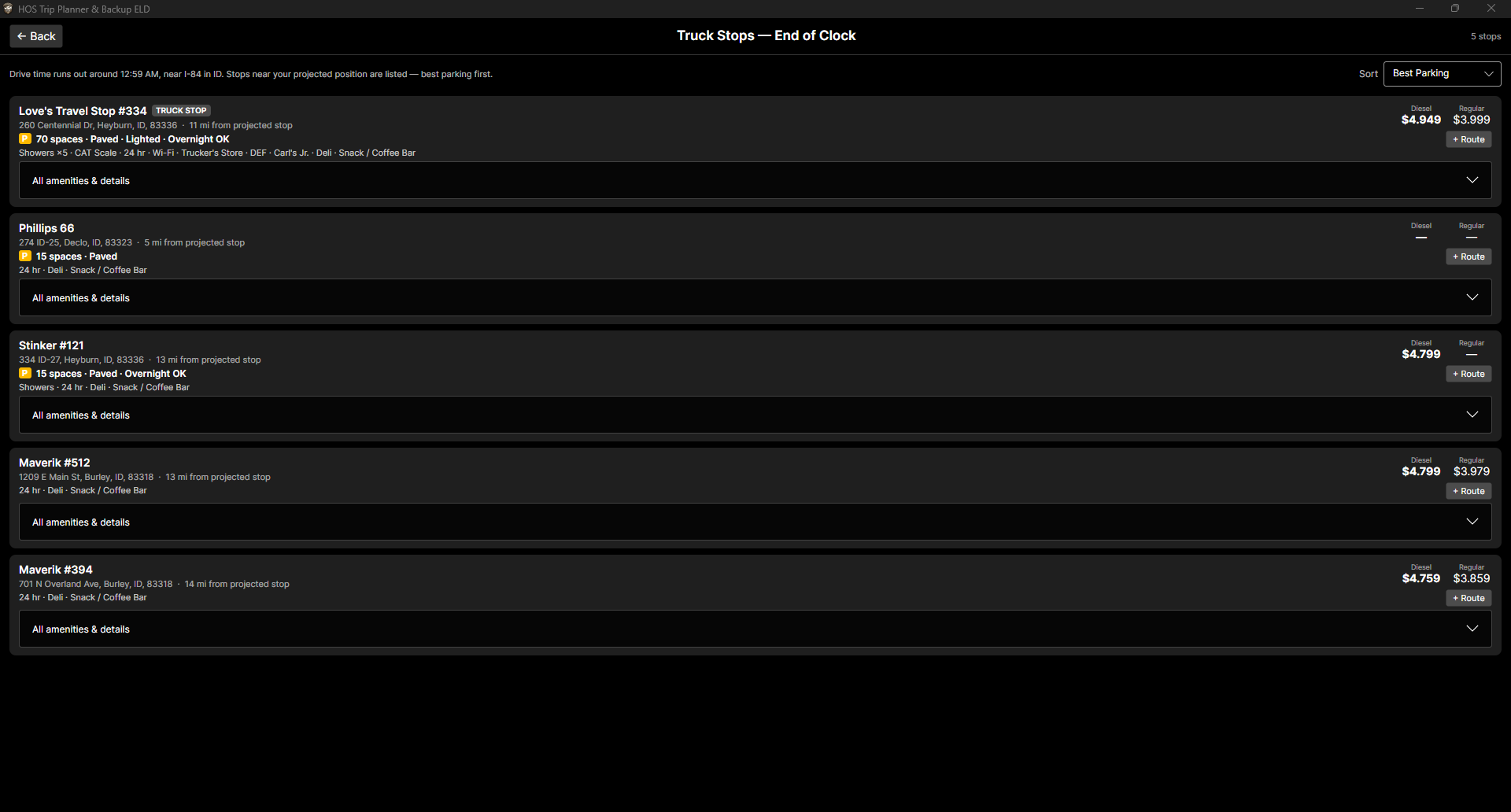
One tap projects where on your route you'll be when your HOS clock actually runs out — then lists the truck stops near that point, parking counts first. Not where you are now. Where your hours end.
Parking planned at 2 PM beats parking hunted at 2 AM.
7-Day Recap
A running recap of hours used in your current cycle window. Always know exactly how much time remains before your 60-hour clock resets.
The rolling 7-day window is calculated correctly. I checked -- several times.
Exceptions & Extensions
Log Shift Extensions, Agricultural Exceptions, and Adverse Conditions directly on the timeline with a long-press drag. Each one adjusts your limits accordingly.
Nothing says "I actually read the whole regulation" quite like implementing the ag exception without being asked.
Multi-Driver Support
Manage multiple drivers, each with their own trip history and ruleset. Switch between them instantly — handy for small dispatch offices or team-driving households.
Data lives on-device. Sync is optional, not mandatory.
GPS Auto Duty Detection
Start rolling and the app logs Driving; park for a few minutes and it asks what you're doing now — with location and odometer stamped on every duty change, ELD-style. Every auto-entry has a one-tap Undo.
The app notices you left. Your dispatcher always did.
Personal Conveyance & Yard Moves
PC and YM as first-class duty statuses: their own timeline rows, correct audit math (PC rests, YM works, neither drives), and proper placement on the printed paper grid.
Implemented the way the ELD guidance says, not the way forums argue.
Printable Daily Logs
Classic paper-grid daily log sheets as PDF for any date range — duty grid, totals, remarks with locations and odometer, your drawn signature on the certification line.
Looks like the log book your first trainer made you fill out. On purpose.
IFTA & Fuel Reports
Log fuel purchases with a long-press on the map, then pull quarterly IFTA summaries — miles and gallons by jurisdiction — and a monthly fuel-history report.
Your quarterly filing, minus the shoebox of receipts.
Drive Screen
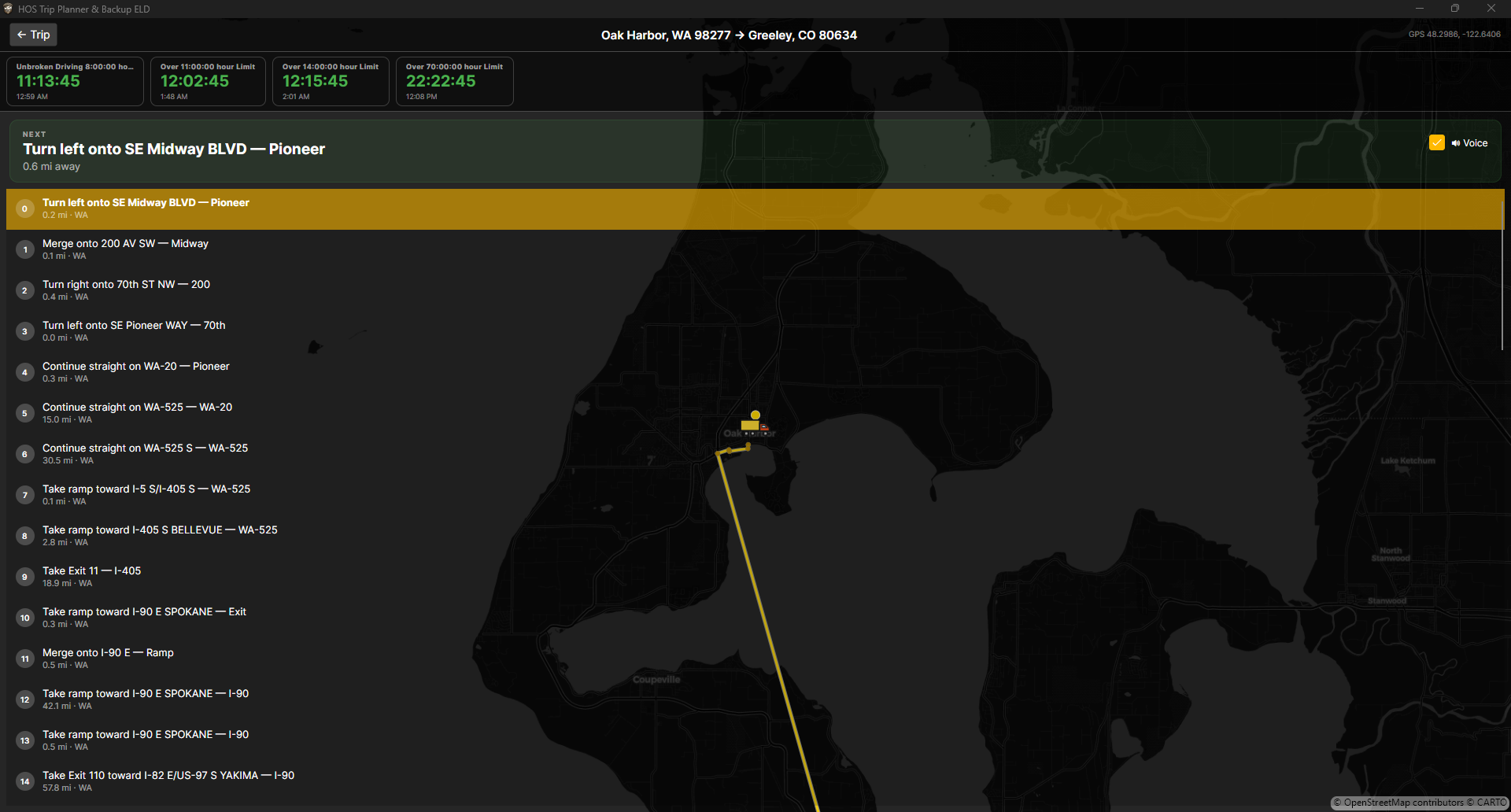
Turn-by-turn directions with the step nearest your GPS position highlighted, live HOS countdowns to your next deadlines, spoken alerts at 60/30/15 minutes, and optional voice-guided directions.
It talks. Only when it has something worth saying.
Sync & Driver Sharing
Optional account syncs your trips, logs, and fuel across devices. Share a driver with your dispatcher by code — they see the duty log, the corrections trail, and any active ELD malfunction as it happens.
Your signature stays home. That part is not negotiable.
Dark & Light Mode
A proper dark theme for nighttime cab use and a clean light theme for daytime. Toggle with one tap. Your eyes will thank you either way.
The dark mode was built first. Make of that what you will.
About the rules engine
The HOS logic is hand-coded from the regulation — not a lookup table, not a duct-taped set of if-statements. It's a proper timeline navigator that evaluates duty status sequences, computes running totals, detects qualifying rests, resolves split pairings, and flags violations. This is the third time The Meddling Idiot has written this engine from scratch — the first two shipped commercially as RapidLog and Logbook.com in the 90s and 2000s. This one is just for fun. and it's the best of the three.
Your route.
Your stops.
One screen.
Import driving directions and your full turn-by-turn route appears overlaid directly on the HOS timeline — so you can see exactly where on the map each hour of your drive lands.
Tap any point along the route to search the Axis fuel network for nearby stops — diesel prices, amenities, and truck parking space counts, right there, without opening a second app.
And when the real question is "where should I stop tonight?", one tap projects where your HOS clock runs out and finds the parking near that point — before everyone else gets there.
Parking where your
hours run out.
One tap answers the real question: "where should I stop tonight?" The planner projects where on your route your drive time actually expires — down to the mile marker — and lists the truck stops near that point.
Sorted by Best Parking first: space counts, paved lots, lighting, overnight rules, showers, and diesel prices — everything you need to commit to a stop while it's still daylight.
Your next turn and
your next deadline.
Turn-by-turn directions with the step nearest your GPS position highlighted, alongside live countdowns to every HOS limit — unbroken driving, the 11-hour, the 14-hour window, and your cycle — each showing the clock time it expires.
Spoken alerts at 60, 30, and 15 minutes before a limit, and optional voice-guided directions. It talks — only when it has something worth saying.
When your ELD dies, keep rolling.
An ELD malfunction doesn't park your truck — but 49 CFR §395.34 hands you immediate paperwork: reconstruct paper logs for today and the prior 7 days, notify your carrier in writing within 24 hours, and run paper until it's fixed. This app produces exactly that paperwork.
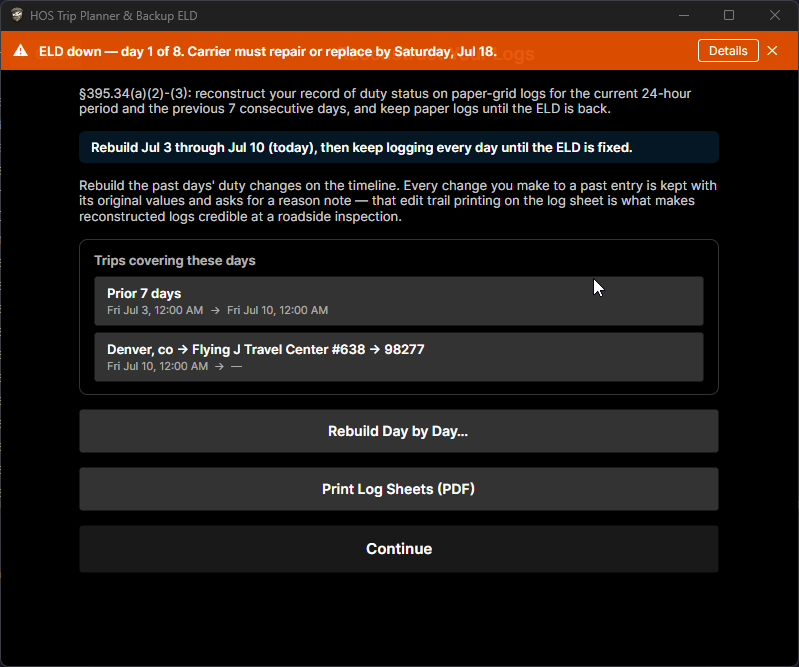
ELD Down Wizard
Record the malfunction, generate and email the written carrier notice, and track the 8-day repair countdown with reminders — every §395.34 duty, in order, with the deadlines watched for you.
Because the one day you need this is the worst day to read a regulation.
Guided Reconstruction
Rebuild your record of duty status day by day on the same interactive timeline you plan with. The guide walks all 8 days, routes today's trip, and hands you back to the wizard when you're done.
The grid you already know, pointed backwards.
Corrections That Hold Up
Every after-the-fact edit is annotated with the original values retained — moves, status changes, additions, deletions, even GPS outages. The annotations print on the log sheets in small print, where an inspector expects them.
Reconstructed logs are only worth what their audit trail says they are.
Roadside Packet
One tap: today + the prior 7 days as signed paper-grid log sheets (PDF), with your malfunction notice attached, generated and handed straight to the share sheet while the officer waits.
Built for the moment when fumbling is not an option.
Back Office Export
A spreadsheet-ready CSV bundle for your carrier: every duty change with location and odometer, the full correction audit trail, malfunction reports, and the GPS trail. Opens in Excel.
Your safety department will assume you hired a consultant.
Drawn Signatures
Sign once on the screen; every generated log sheet carries your certification. Your signature never leaves your device — it is deliberately excluded from sync so nobody else can ever apply it.
The one piece of data we refuse to move, on principle.
The honest fine print
This app is not a registered ELD and is not on the FMCSA registry. It doesn't replace a compliant ELD for drivers required to use one. It produces the paper records §395.34 requires while your ELD is being repaired or replaced — which, when your ELD is dead, is precisely what the regulation wants from you.
Four steps. No manual required.
If you've ever used a calendar, you can use this. The regulations are complicated. The app doesn't have to be.
Add Your Driver
Name, ruleset, done. No account, no email address, no terms of service scroll.
Start a Trip
Set your origin and destination. Import a route to get driving directions on the timeline.
Plot Your Day
Drag markers onto the timeline to build your planned log. Violations flag the moment you cross a limit.
Relax Knowing
You've already seen your rest windows, your reset time, and your fuel stops. Now go drive.
The rules, correctly.
Select your ruleset and every limit, rest target, split calculation, and violation check adjusts automatically. These numbers come directly from the regulation.
US 60 Hours in 7 Days
The standard property-carrying ruleset for drivers operating on a 7-day cycle with a 60-hour limit.
US 70 Hours in 8 Days
Same rules as the 60-hr property ruleset but on an 8-day rolling cycle with a 70-hour limit.
US Bus 60 Hours in 7 Days
Passenger-carrying ruleset on a 7-day cycle — same driving and shift limits, adjusted rest and split rules for bus operations.
US Bus 70 Hours in 8 Days
Passenger-carrying ruleset on an 8-day cycle with a 70-hour window.
US Oilfield 60 Hours in 7 Days
The 60-hr property ruleset with support for the Oilfield exception, including Off Duty / Waiting at Well Site as a qualifying rest status.
US Oilfield 70 Hours in 8 Days
Same Oilfield exception support on an 8-day / 70-hour cycle.
US Sleeper Pilot 60 Hours in 7 Days
The 60-hr ruleset with the modified sleeper berth split rules — any combination of qualifying periods adding up to 10 hours, with no minimum larger split required.
US Sleeper Pilot 70 Hours in 8 Days
Same flexible sleeper berth split rules on an 8-day / 70-hour cycle.
Texas Intrastate 70/7
12 hours driving after 8 off, no driving past the 15th cumulative on-duty hour, 70/7 cycle, 34-hour restart, no 30-minute break requirement (37 TAC §4.12).
California Intrastate 80/8
12 hours driving after 10 off inside a 16-hour window, 80 hours in 8 days, no 30-minute break requirement (13 CCR §1212.5).
Florida Intrastate 70/7
12 hours driving after 10 off, 16-hour window, 70/7 cycle with a 34-hour restart (Fla. Stat. §316.302).
Florida Intrastate 80/8
The same Florida rules on an 8-day / 80-hour cycle, for carriers operating every day of the week.
Yes, the intrastate rules really are that different. Yes, each one was read in the original. No, it was not fun. (It was a little fun.)
Works wherever you are.
Because apparently writing one codebase that compiles to multiple platforms is exactly the kind of thing The Meddling Idiot finds relaxing.
Same app, same rules engine, same data — on every device you own.
Questions you might have
Answered with the candor of someone who has no marketing department.
Is this an ELD replacement?
No. It is not a registered ELD and it doesn't pretend to be one. It's a planning tool with one very specific superpower: when your real ELD malfunctions, federal rules (49 CFR §395.34) require paper logs, a written carrier notice, and an 8-day repair clock — and this app produces exactly that paperwork, start to finish. Your ELD records what happened; this plans what should happen, and covers the gap when the ELD can't.
Are the rules actually correct?
The rules engine has been written by the same person three times — once for RapidLog, once for Logbook.com, and now this. On more than one occasion, that same person has cited chapter and verse of CFR Part 395 to a DOT officer who turned out to be wrong about their own regulation. It was, frankly, quite fun. That said, regulations change, hobbyists are not compliance attorneys, and you should always verify anything that actually matters against the current regulation (49 CFR Part 395) or a qualified professional. But the engine itself? It's probably fine.
What does it cost?
Your first 8 trips are free — no credit card, no commitment, just use it. After that it's $3.99/month or $30/year, which unlocks unlimited trips, sync, and the full Backup ELD toolkit. Cheaper than the ticket you'd get for going over hours.
Where does my data go?
By default, nowhere — it stays on your device, and there's no analytics or tracking of any kind. If you create an account (optional), your trips and logs sync through our server so they follow you across devices, and you can share a driver with your dispatcher. Your drawn signature never leaves your device, ever. Details in the privacy policy.
Will you add more rulesets?
Probably. There are always more edge cases to implement. Reading another section of the regulation for the fourth time is apparently what passes for entertainment around here.
Know your hours before you leave the yard.
Stay legal when your ELD gives up.
First 8 trips free. Then $3.99/month or $30/year — unlimited trips, sync, and the full Backup ELD toolkit. No surprises.
Android & iOS coming soon · Your data stays on your device